

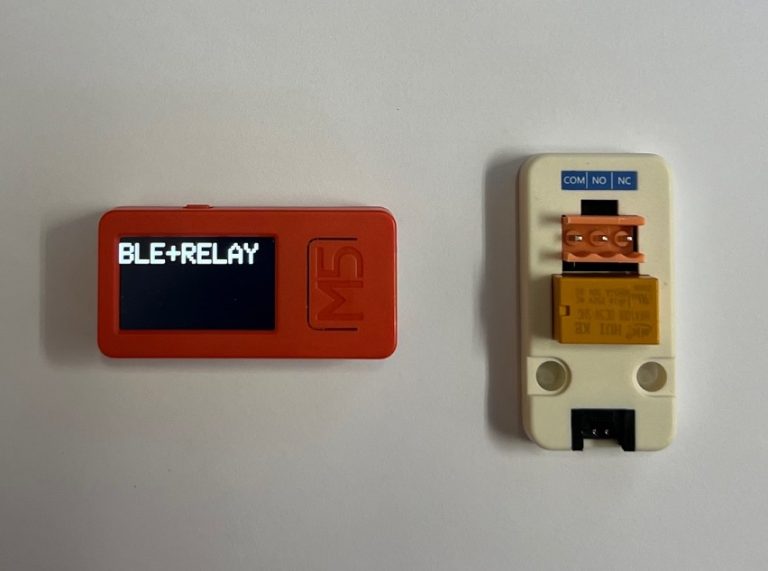
この実験では、M5StickCPlusを用いてM5Stack用ミニリレーユニットをBluetoothで制御します。Bluetooth経由で”1”いう文字を受信するとリレーをオン、”0”という文字を受信すると、リレーをオフします。
構成
プロジェクト名:M5-BLE-RelayDemo
デバイス:M5STICK CPLUS+M5Stack用ミニリレーユニット【M5STACK-MINIRELAY-UNIT】
プログラム
//********************************************************
// Project :M5Stack用ミニリレーユニット【M5STACK-MINIRELAY-UNIT】を
//          BLEでオンオフする。
// Device  : M5StickCPlus
// Tool    : "ツール"→"pertition scheme"→"no OTA"
// Created :2021.12.08
// Update  :2024.03.14
//
// 参 考   :
//********************************************************
//========================================================
//ライブラリを追加
//========================================================
#include <M5StickCPlus.h>
#include "BluetoothSerial.h"
//========================================================
//変数
//========================================================
BluetoothSerial SerialBT;
//========================================================
//初期化
//========================================================
void setup() {
  M5.begin();
  Serial.begin(115200);
  SerialBT.begin("ESP32_RELAY");
  SerialBT.println("Hello World");

  M5.Lcd.fillScreen(BLACK);

  pinMode(32, OUTPUT);

  M5.Lcd.setRotation(1); 	//画面の向き(横)
  M5.Lcd.setTextSize(4);
  M5.Lcd.setTextColor(WHITE);
  M5.Lcd.setCursor(0, 10);
  M5.Lcd.println("BLE+RELAY");
}
//========================================================
//メイン
//========================================================
void loop() {
  //------------------------------------------------------
  // BLE受信
  //------------------------------------------------------
  if (SerialBT.available()) {
    int data_=SerialBT.read();

    //リレーオン
    if ( data_== '1') {
      SerialBT.println("Relay On");
      M5.Lcd.fillScreen(WHITE);
      digitalWrite(32, HIGH);
      M5.Lcd.setCursor(0, 10);
      M5.Lcd.println("Relay On");
    }
    //リレーオフ
    else if ( data_== '0') {
      SerialBT.println("Relay Off");
      M5.Lcd.fillScreen(GREEN);
      digitalWrite(32, LOW);
      M5.Lcd.setCursor(0, 10);
      M5.Lcd.println("Relay Off");
    }
    else {
      SerialBT.println("Undefine");
      M5.Lcd.fillScreen(RED);
      M5.Lcd.setCursor(0, 10);
      M5.Lcd.println("Undefine");
    }
  }
  delay(1000);
}

コメント