
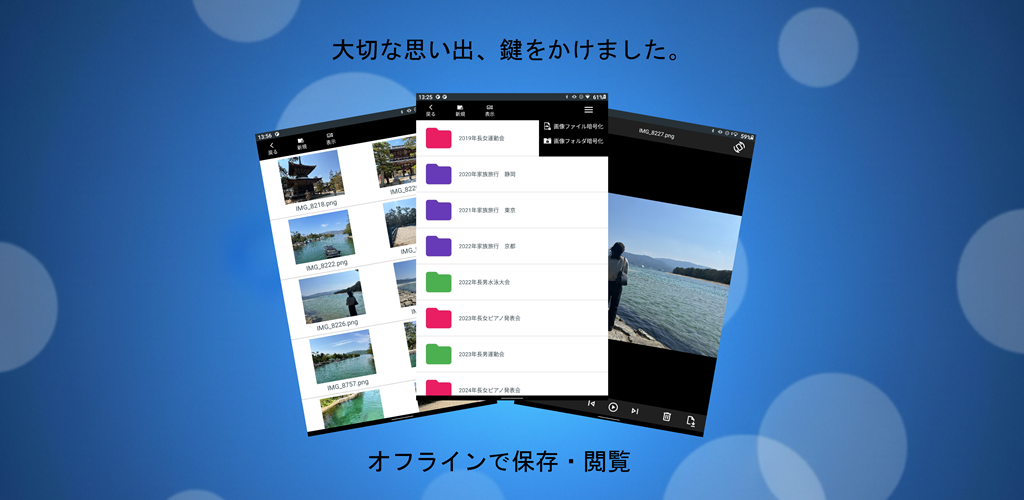
The image preview screen and video playback screen are the “face” of the app— the places users interact with the most. Designing these screens required solving a difficult contradiction:
Keep all media fully encrypted, yet make the UI feel instantly responsive and effortless. And ensure elderly users never get confused, while protecting against accidental misuse by children.
This article summarizes the design decisions, technical challenges, and real‑device pitfalls encountered while building the encrypted preview and playback system.
- 1. Image Preview: Designed for Reuse Across Future Apps
- 2. Video Playback: Simple UI, No Compromise on Experience
- 3. Three Major Pitfalls During Implementation
- 4. The Hardest Problem: Detecting Broken or Odd MP4 Files
- 5. Future Challenges
- Download the App on Google Play
- Download the app on Google Play (opens Google Play)
- Related Articles
1. Image Preview: Designed for Reuse Across Future Apps
The image preview component was built not just for this app, but as a reusable module for future projects.
Separate Adapters for Images and Videos
To keep the architecture clean and portable, image and video adapters were implemented as completely separate classes. This prevents code bloat and makes the components easy to reuse.
Rich Preview Features
The preview screen supports:
- Swipe navigation
- Slideshow mode
- Pinch‑to‑zoom
- Drag to pan
- Delete images directly
- Encrypted in‑app screenshot (system screenshots disabled)
Encrypted Screenshot System
System-level screenshots are blocked for security. Instead, the app generates an encrypted screenshot file internally, allowing users to save memories safely.
Rotation Control
Users can enable or disable device rotation depending on whether the photo is vertical or horizontal.
2. Video Playback: Simple UI, No Compromise on Experience
The video player aims to be as simple as possible while still feeling modern and responsive.
Core Playback Features
- Instant play/pause
- Real-time duration and position display
- Seek bar with intuitive scrubbing
- Auto-hide controls for a clean viewing experience
Advanced Controls
- Swipe to adjust volume
- Playback speed control
- Zoom and pan (same as images)
- Delete video
- Encrypted screenshot support
On-demand Thumbnail Generation
Video thumbnails are created only on first playback, then encrypted and cached. This keeps the file list screen lightweight.
3. Three Major Pitfalls During Implementation
These were the toughest challenges—solved through trial and error with AI tools like Copilot and Gemini.
1. The Deep Pit of Zoom & Position Persistence
When swiping to the next image, the previous zoom level and coordinates sometimes carried over, breaking the layout.
Attempts to preserve zoom state elegantly ran into complex interactions between touch events and view lifecycle.
The final stable solution:
Reset zoom and position to default whenever switching images.
A smarter state-preservation model is planned for future updates.
2. Tablet Gesture Navigation vs App Swipe Gestures
On NEC tablets, the system’s “swipe from left edge to go back” gesture conflicted with the app’s “swipe to change image.”
Disabling the system gesture caused another issue: testers reported that the standard bottom navigation “Back” button stopped working.
The final decision:
Restore system gestures and rely on standard OS behavior.
This avoids confusing users and respects Android’s navigation conventions.
3. Migrating from MediaPlayer to ExoPlayer
MediaPlayer could not handle real-time decryption + streaming. It froze or behaved unpredictably with certain MP4 files.
The solution:
Full migration to ExoPlayer, which offers better customization and stability.
4. The Hardest Problem: Detecting Broken or Odd MP4 Files
Some MP4 files—especially those converted from iPhone videos—behaved strangely:
- Freezing
- Failing silently
- Causing unpredictable playback behavior
The app now checks for suspicious files before playback and shows an error message when needed. However, detecting every edge case remains challenging.
5. Future Challenges
AI tools suggested that supporting more video formats may require:
Switching to an entirely different playback engine beyond ExoPlayer.
This will be a major undertaking for future versions.
Download the App on Google Play
- Free
- Fully offline
- AES-encrypted storage
- Minimal ads (file list only)
▼Download the app on Google Play (opens Google Play)

Download the app on Google Play (opens Google Play)
- Free
- Fully offline
- AES-encrypted storage
- Minimal ads (file list only)
Related Articles
Explore more behind the development of this encrypted media app:
- Building an Offline Encrypted Android App Why the app was created and the philosophy behind its fully local design.
- Encrypted Video Streaming on Android Technical deep dive into partial decryption, secure playback, and performance tuning.
- Design Trade-offs in Android Encryption UI/UX decisions, storage dilemmas, and practical compromises made during development.
- Encrypted Android Playback & Preview How encrypted image and video playback achieves smooth performance and secure behavior across devices.


コメント