
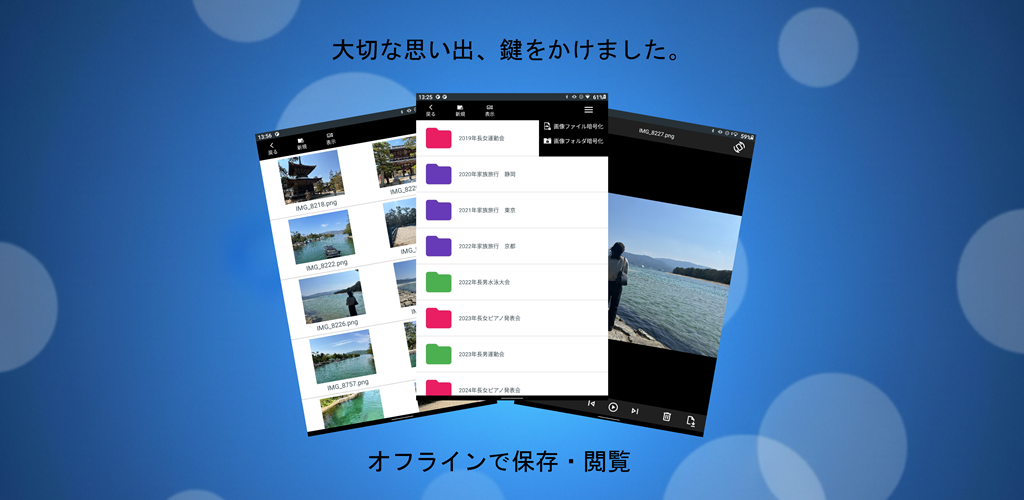
Developing an encrypted media app that works entirely offline—without cloud sync, ads, or unnecessary complexity—was born out of real problems in my own family. This article summarizes the motivations behind the project, the technical decisions that shaped the app, and the engineering challenges solved through trial‑and‑error with AI tools like Copilot.
- 1. Why I Built This App: Real Problems in Everyday Life
- 2. A Different Approach from Typical “Lock Apps”
- 3. Encrypting the Files Themselves, Not Just Hiding Them
- 4. Smooth Preview and Playback While Keeping Everything Encrypted
- 5. Thoughtful Use of Ads: Only Where They Don’t Interfere
- Download the App on Google Play
- Related Articles
1. Why I Built This App: Real Problems in Everyday Life
Three issues pushed me to create a dedicated encrypted media viewer for my parents:
Accidental exposure from “screen left on” moments
My elderly parents often left their phones unlocked with family photos visible. It wasn’t intentional, but it created uncomfortable situations where private memories could be seen by anyone nearby.
Kids accidentally opening private folders
When grandchildren borrowed the phone to play games, they sometimes opened photo folders by mistake. This unintentional access was a privacy risk.
Existing apps were overloaded with intrusive ads
I tried several “secure folder” apps, but all of them were filled with ads— including full‑screen ads that appeared right when trying to view a video. For elderly users, closing these ads was confusing and frustrating.
These problems made it clear:
We needed a simple, offline, ad‑free place where family photos and videos could be viewed safely.
So I decided to build it myself.
2. A Different Approach from Typical “Lock Apps”
App-private storage to eliminate cloud leakage
Many apps rely on cloud backup or sync features. This introduces risks—misconfigured settings or automatic uploads can expose private media online.
To avoid this entirely, the app stores all encrypted files in Android’s app-private directory (Context.filesDir), which:
- Cannot be accessed by other apps
- Cannot be viewed from a PC
- Is deleted automatically when the app is uninstalled
This last point was a major design decision. I chose to embrace it.
The app is not meant to be a permanent archive. Master copies of photos and videos should live on a PC or secure storage. The app’s role is simply:
A safe viewer for selected media on a device that may be handled by elderly parents or children.
If the device is lost—or if the app is intentionally removed— the encrypted media disappears completely, leaving no trace.
This “intentional deletion” became part of the app’s security philosophy.
3. Encrypting the Files Themselves, Not Just Hiding Them
Many “hidden folder” apps simply rename files or move them to obscure directories. This only hides them from casual browsing.
If the phone is connected to a PC or inspected with advanced tools, the files can still be extracted.
In contrast, this app:
- Encrypts every file with AES
- Stores only encrypted bytes in the private directory
- Leaves no readable metadata or thumbnails
- Ensures that even if files are extracted, they appear as meaningless data
This eliminates the risk of private photos being viewed on a PC.
4. Smooth Preview and Playback While Keeping Everything Encrypted
This was the hardest technical challenge—and the part where AI helped the most.
Decrypting entire videos before playback is slow and leaves temporary files behind. Instead, the app:
- Decrypts only the necessary segments
- Streams decrypted data directly in memory
- Avoids writing temporary files
- Starts playback instantly, even for large videos
This required careful tuning, but the result is a fast, seamless viewing experience that remains fully offline and secure.
5. Thoughtful Use of Ads: Only Where They Don’t Interfere
This app was my first release on Google Play, so I used it as an opportunity to learn AdMob. However, I refused to include intrusive ads.
The rules were simple:
- Only a small banner at the bottom of the file list
- No ads during photo viewing
- No ads during video playback
This keeps the viewing experience clean and distraction‑free.
Download the App on Google Play
- Free
- Fully offline
- AES-encrypted storage
- Minimal ads (file list only)
▼Download the app on Google Play (opens Google Play)

Related Articles
Explore more behind the development of this encrypted media app:
- Building an Offline Encrypted Android App
Why the app was created and the core philosophy behind its fully local design. - Encrypted Video Streaming on Android
Technical deep dive into partial decryption, secure playback, and performance tuning. - Design Trade-offs in Android Encryption
UI/UX decisions, storage dilemmas, and practical compromises made during development. - Encrypted Android Playback & Preview How encrypted image and video playback achieves smooth performance and secure behavior across devices.
コメント