
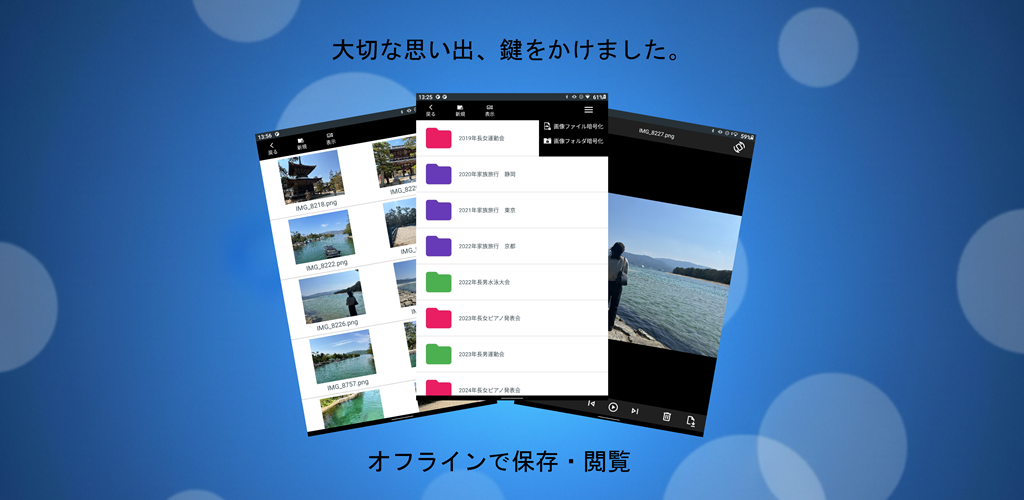
Why I Decided to Build This App
This project started from three very real problems inside my own family:
1. Elderly parents accidentally leaving private photos on screen
My parents often view family photos and videos on their phones. But sometimes they forget to lock the screen and leave the device unattended. It’s harmless, but you never know who might see it.
2. Kids accidentally opening private folders while playing games
When grandchildren borrow the phone to play games, they sometimes tap into private photo folders by mistake. Not intentional—but risky.
3. Existing “secure folder apps” were unusable due to aggressive ads
I tried several apps with lockable folders. Every one of them was filled with intrusive ads—full‑screen ads, forced video ads, confusing UI. My parents couldn’t use them safely.
So I decided:
“I need a completely offline, ad‑free, ultra‑simple vault where my parents can safely view family photos and videos.”
Key Design Philosophy: Fully Local, No Cloud, No Ads
1. App‑private storage to eliminate cloud leakage
Google Photos is powerful, but its core philosophy is cloud backup. Even with careful settings, there’s always a risk of accidental sync.
This app stores everything only inside the app’s private directory (Context.filesDir). This means:
- No cloud sync
- No external access
- Data is deleted automatically when the app is uninstalled
This “delete on uninstall” behavior was a major design decision. But the app is not meant to be a permanent archive—master data is stored safely elsewhere. This app is only for safe viewing on a portable device.
2. Not “hiding” files — encrypting them with AES
Many “hidden photo apps” simply rename files or move them to obscure folders. If someone connects the phone to a PC, the files can still be extracted.
This app encrypts every file with AES, stored only as ciphertext. Even if someone obtains the raw files, they are unreadable garbage.
3. Real‑time decryption for smooth preview & playback
This was the hardest part.
Decrypting entire videos to temporary files is:
- slow
- leaves traces
- risks crashes on low‑memory devices
So I implemented real‑time AES streaming, decoding only the necessary chunks in memory. This allows:
- instant image preview
- smooth video playback
- zero temporary files
- zero leakage
A Minimal Approach to Ads (Only One Banner)
This was my first Google Play release, so I experimented with ads. But I refused to include intrusive ads.
- Only one small banner at the bottom of the file list
- No ads during photo viewing
- No ads during video playback
The viewing experience remains clean and distraction‑free.
Download on Google Play
- Free
- Fully offline
- AES‑encrypted storage
- Minimal ads (file list only)
👉 Download on Google Play
▼Download the app on Google Play (opens Google Play)

Next Article: Technical Deep Dive
In the next article, I’ll cover the engineering challenges:
- Switching from full decryption to partial streaming
- Separating image/video adapters
- Refactoring the encryption hierarchy for password changes
- Fixing preview artifacts when swiping images
- Clearing task previews instantly when backgrounding
- Handling device‑specific “Back” behavior
- Async thumbnail decryption for smooth scrolling
Related Articles
Explore more behind the development of this encrypted media app:
- Building an Offline Encrypted Android App
Why the app was created and the core philosophy behind its fully local design. - Encrypted Video Streaming on Android
Technical deep dive into partial decryption, secure playback, and performance tuning. - Design Trade-offs in Android Encryption
UI/UX decisions, storage dilemmas, and practical compromises made during development. - Encrypted Android Playback & Preview How encrypted image and video playback achieves smooth performance and secure behavior across devices.

コメント