
Overview
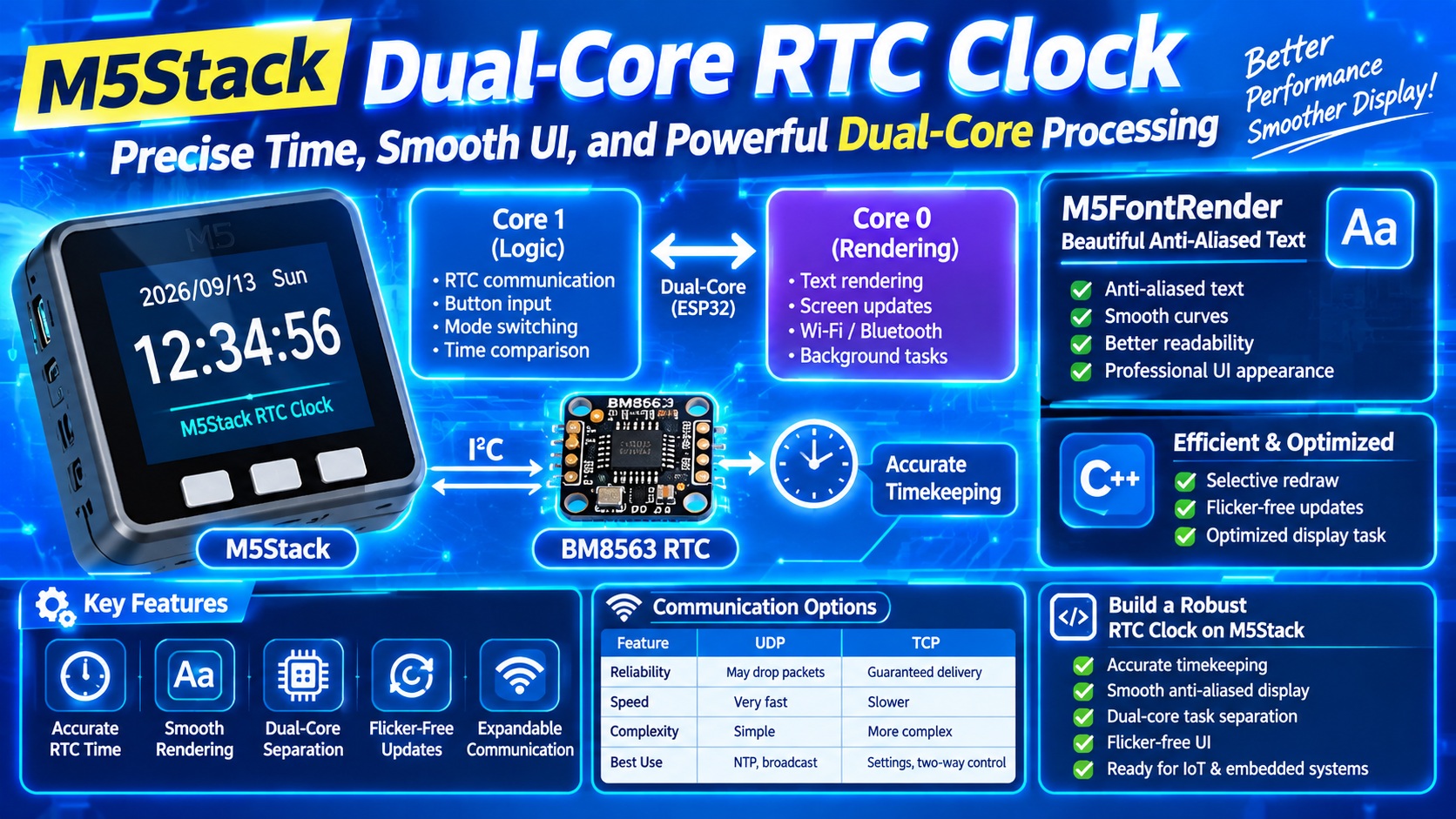
This project demonstrates how to build a smooth, accurate, and visually refined desk clock using:
- M5Stack (ESP32 DualCore)
- BM8563 RTC
- M5FontRender for anti‑aliased text
- DualCore task separation for stable rendering
- Selective screen updates for flicker‑free UI
Compared to standard or binary fonts, it enables beautiful text rendering with anti-aliasing.
The result is a professional‑grade clock with precise timing and fluid animations.
🧩 System Architecture
Core 1 (Logic Core)
Handles:
- RTC communication
- Button input
- Mode switching
- Time/date comparison
Core 0 (Rendering Core)
Handles:
- Heavy text rendering
- Screen updates
- Wi‑Fi/Bluetooth background tasks
Why this matters: Core 0 is responsible for system services. Without delay(1) or vTaskDelay(), the watchdog timer resets the device.
🕒 RTC (BM8563) Integration
Why BM8563?
- Maintains time even when M5Stack is powered off
- Low‑power, stable I²C interface
- Simple BCD‑based registers
RTC Write Function (Optimized)
cpp
void setRTC(uint16_t year, uint8_t month, uint8_t day,
            uint8_t hour, uint8_t min, uint8_t sec) {
    Wire.beginTransmission(0x51);
    Wire.write(0x02);
    Wire.write(decToBcd(sec));
    Wire.write(decToBcd(min));
    Wire.write(decToBcd(hour));
    Wire.write(decToBcd(day));
    Wire.write(0x00);
    Wire.write(decToBcd(month));
    Wire.write(decToBcd(year % 100));
    Wire.endTransmission();
}
RTC Read Function (Optimized)
Reads 7 bytes and converts BCD → decimal.
🎨 High‑Quality Rendering with M5FontRender
M5FontRender provides:
- Anti‑aliased text
- Smooth curves
- Better readability
- Professional UI appearance
This is a major upgrade over default M5Stack fonts.
⚙️ DualCore Display Task (Enhanced Explanation)
The display task runs on Core 0 and updates only the areas that changed:
✔ Selective Redraw
- Date area (x=30, y=80)
- Time area (x=30, y=110)
✔ Mode‑based full refresh
When switching modes, the entire screen is cleared once.
✔ Flicker‑free updates
Only redraw when values change.
Optimized Display Task Snippet
cpp
if (task_no != last_task_no) {
    M5.Lcd.fillScreen(BLACK);
    last_task_no = task_no;
}

if (!isDateSame(now_date, old_date)) {
    M5.Lcd.fillRect(30, 80, 260, 26, BLACK);
    render.setCursor(30, 80);
    render.printf("Date: %04d/%02d/%02d", now_date.year, now_date.month, now_date.day);
    old_date = now_date;
}

if (!isTimeSame(now_time, old_time)) {
    M5.Lcd.fillRect(30, 110, 260, 26, BLACK);
    render.setCursor(30, 110);
    render.printf("Time: %02d:%02d:%02d", now_time.hour, now_time.min, now_time.sec);
    old_time = now_time;
}
📡 Future Communication Options (UDP vs TCP)
| Feature | UDP | TCP |
|---|---|---|
| Reliability | May drop packets | Guaranteed delivery |
| Speed | Very fast | Slower |
| Complexity | Simple | More complex |
| Best Use | NTP, broadcast | Settings, two‑way control |
UDP is ideal for time sync, while TCP is ideal for configuration commands.
🚀 Why DualCore Was Essential
When Wi‑Fi communication (especially TCP sockets) is added:
- Rendering may lag
- Time updates may stutter
- UI may freeze
DualCore ensures:
- Rendering stays smooth
- RTC updates remain accurate
- Network tasks never block UI
🧭 Summary
This enhanced version of the M5Stack RTC clock provides:
- Accurate RTC timekeeping
- Smooth anti‑aliased rendering
- Efficient DualCore task separation
- Flicker‑free selective updates
- Expandable communication options
It is a robust foundation for clocks, dashboards, IoT displays, and embedded UI systems.

コメント